

What is multi-factor authentication (MFA) technology?
MFA, or multi-factor authentication, is a security method that requires a user to verify their identity using two or more separate types of authentication methods to prove their identity to access an account, service or application. It usually combines the knowledge factor (something you know, like a password) with the possession factor (something you have, like a device) and/or an inherence factor (something you are, like a fingerprint or your face).
Confirming identity is more critical than ever: According to the Entrust 2025 Identity Fraud Report, identity attacks are surging, powered by innovations in AI. Usernames and passwords alone no longer protect accounts, which is why many enterprises turn to MFA.
Not familiar with MFA? Curious how it can protect your business or organization? Read on to learn everything you need to know about MFA and why it’s an essential part of a robust identity and access management strategy.
Key takeaways
- MFA increases security by requiring at least one additional authentication factor beyond a username and a password.
- Organizations can require MFA for their workforce to gain secure remote or on-site access to systems and data.
- MFA factors are often related to knowledge (something you know), possession (something you have), or inherence (something you are).
- Integrating MFA into identity verification processes is critical as identity-based attacks become more common and sophisticated.
- MFA can play an essential role in compliance with important industry regulations.
- Technology advancements such as AI, biometric innovations, and blockchain are making MFA stronger and more secure, even as threats evolve.
- Entrust helps financial institutions secure the consumer journey with a unified identity view, starting with biometric onboarding and KYC/AML, enabling secure access and high-risk transaction authentication, and ensuring ongoing compliance through adaptive risk-scoring and CIAM policy enforcement.
MFA definition
What is MFA? According to the National Institute of Standards and Technology (NIST), it’s an authentication method that requires more than one distinct “authentication factor” to use a website, application, or system.
An authentication factor is a security credential that verifies a user's identity when they try to access a particular resource. For example, when someone logs into an email account, they typically submit a username and password. These credentials are a form of identification, showing the request comes from a legitimate user, not a bad actor.
Multi-factor authentication aims to make this process more secure by requiring at least one additional authentication method. Why? Because if bad actors compromise login credentials, they can gain unauthorized access to key resources and sensitive information.
Let’s say cybercriminals get access to an account belonging to a privileged user in your organization (e.g., someone with permission to access critical IT systems and perform activities that standard users are not permitted to do). They can exfiltrate hordes of personal identifiable information, like Social Security numbers, financial information, and more. A data breach could lead to employee and/or customer data theft and have significant business impacts, costing $4.4 million on average.
That’s where MFA solutions come into play. With the right system, organizations can protect workforce, consumer, and citizen identities through layers of strong authentication.
What’s the difference between MFA and two-factor authentication (2FA)?
Since 2FA requires exactly two identifiers, it’s a subset of multi-factor authentication, which requires two factors at a minimum.
In theory, MFA is typically more secure than 2FA because it can encompass as many authenticators as you want for any specific use case. Each additional factor makes unauthorized access more difficult, squeezing another layer of protection between hackers and sensitive information.
That said, 2FA is still significantly better than relying on single factor authentication, as traditional password protections are much too vulnerable to modern cyber threats.
MFA examples
How do organizations use multi-factor authentication? Some of the most common use cases include:
- Remote access for employees: In the United States alone, almost 23% of people work from home. As hybrid work increases worldwide, companies must give users secure remote access to critical resources. MFA solutions allow them to identify and protect workforce identities while accommodating the convenience of work-from-anywhere policies. Government employees working from home may need to access internal applications, such as email, HR/payroll systems, or applications with private data. MFA ensures only authorized individuals can access them outside the secure network.
- On-site system access: Likewise, on-premises systems, such as in healthcare, are vital stores of protected information. With the right MFA solution, employees can use proximity badges alongside credentials to access patient databases quickly and securely.
- Citizen remote access: When individuals use online government services, for example, MFA helps ensure only the legitimate account holder can access or modify personal data.
- Customer access: When customers are using financial institutions, like accessing their bank accounts and making transactions, MFA make sure only the account holder can access relevant funds/information.
How does MFA work?
The process depends on the exact MFA technology and method in use. However, regardless of specifics, the workflow generally goes as follows:
- User login: The user verifies their identity using the first form of authentication, which is something we know (often username and password). This may be part of a business’s single sign-on solution, enabling access to multiple platforms and applications.
- Authentication request: If the primary login is successful, the system asks for an additional factor.
- MFA verification: The user provides the second authentication factor, such as a one-time passcode (OTP) generated by an authenticator app, a push notification, biometric authentication, or a hardware token.
- Optional third factor: An MFA solution may invoke more authentication requests if configured to do so.
- Successful authentication: If all factors are verified, the user gains access to the system.
This process typically takes just moments to complete and has minimal impact on user experience. Ultimately, it depends on how many authentication methods/factors you require, which fall into three categories: knowledge, possession, and inherence.
Knowledge factor
A knowledge factor refers to something only the user would know, like a password or PIN. Multi-factor authentication systems have added more knowledge factors over time, the most common example being the answer to a secret question (e.g., your mother’s maiden name, high school mascot, etc.).
However, this is the weakest of any MFA factor because it can be easily guessed, phished, or social engineered. For instance, it doesn’t take much effort for hackers to obtain secret question answers from social media profiles, as they often are based on personal information. Likewise, they’re also susceptible to phishing attacks.
Possession factor
The possession factor includes something only the user would have. Today, there are several advanced types of possession-based verification in MFA technology, such as:
- OTP: One-time passcodes delivered via email or SMS.
- Push notification: Alerts sent to the user’s mobile device requesting confirmation of their access request — the idea being only the owner would have the device.
- Hardware token: FIDO2 keys, and other physical devices that users plug into a desktop. They contain encrypted information, which authenticates the user’s identity.
- Virtual security keys: These function like hardware tokens but do not require a physical key, instead using cryptographic credentials in a device.
- Smart devices: Devices like mobile phones, wearables, and tablets that are close at hand are convenient for securely receiving authentication codes.
- Grid card: Although it is less common today, some organizations still use this method. Paper-based cards printed from PDF files contain a grid of rows and columns consisting of numbers and characters. Users must provide the correct information in the corresponding cells from the unique card they possess.
Inherence factor
An inherence factor includes information that is inherent to the specific user. Compared to possession and knowledge factors, it’s easiest to consider inherence something you are. Thus, it’s also referred to as biometric authentication, leveraging MFA methods like:
- Fingerprinting
- Retina scanning
- Voice recognition
- Facial recognition
- Multimodal biometrics (combining two or more types)
Because biometric authentication is innately difficult to bypass, inherence-based factors are among the most secure options available for multi-factor authentication.
What is adaptive authentication?
Adaptive authentication, also known as adaptive MFA or risk-based authentication, is an evolving type of verification integrated into the process for additional security. It analyzes contextual information to determine the risk level of whichever user profile is requesting access to a resource, increasing or decreasing security requirements accordingly.
More simply, adaptive MFA requires additional factors when there’s a greater chance the request is illegitimate. The greater the risk, the stronger its challenges will be.
For example, adaptive authentication evaluates the following:
- Number of failed login attempts
- Source IP address or geographic location
- Device reputation
- Day and time of attempt
- Operating system
- User role
Software can compare these and other factors in real time to a user’s past behavior to identify anomalies that may indicate compromised credentials. If the access request is suspicious, it prompts users to confirm their identity using an OTP or push notification. Likewise, if everything is normal, it may not issue any challenges whatsoever, offering a seamless user experience.
Why is MFA important?
Hackers are targeting identities at an unrelenting pace. In 2024, more than 3.2 billion credentials were compromised, an increase of 33% year over year. The impacts can be devastating: fraud, identity theft, compliance violations, monetary losses, and reputational damage.
Despite the increasing risks, many businesses are underprepared for identity-based threats. According to a 2024 study, 84% of businesses said incidents related to identity security directly affected operations, up from 68% the previous year. Over 40% of them said that implementing MFA could have mitigated the damage. Yet only slightly more than half had done so.
MFA can reduce attacks with layers of defense that make unauthorized access much more difficult. Even when passwords are compromised by phishing or breaches, MFA serves as a strong barrier to all but the most sophisticated threat actors.
In addition, many compliance frameworks now require MFA, making it essential for meeting regulatory requirements in industries like healthcare, finance, and government contracting. For example, the Criminal Justice Information Services (CJIS) Security Policy mandated multi-factor authentication (MFA) implementation by October 1, 2024.
Perhaps most importantly, MFA technology as an element of data security helps businesses ensure customer trust and brand reputation, assets that can be seriously damaged by a single security incident.
MFA and zero trust
MFA is an adequate answer to cyber threats past and present — but critically, it’s also the foundation of the cyber-resilient future, along with zero trust security.
Zero trust is a modern security framework built on the concept of “never trust, always verify.” It treats every user, device, and application as a potential source of a compromise to the system. MFA enables this concept in practice not just once, but continuously.
By requiring multiple forms of verification, MFA ensures that even if one credential is compromised, unauthorized access remains blocked. With a robust MFA system built on zero trust as part of an identity and access management (IAM) platform, enterprises can feel confident about their ability to prevent unauthorized access and identity-based attacks.
MFA benefits and challenges
Why bother with multi-factor authentication? For starters, it brings numerous advantages to the table:
- Enhanced data security: MFA protects against password fatigue, phishing attacks, and other credential-based threats, reducing the risk of account takeovers.
- Improved compliance: It also helps organizations meet various regulatory requirements and industry standards. By using MFA, organizations can demonstrate their commitment to safeguarding data in the face of increased threats.
- Stronger trust: When customers know that an organization is using robust security measures like MFA, their confidence in the safety of their personal and financial data increases.
- Reduced costs: MFA helps organizations avoid the substantial expenses associated with incident response, legal fees, regulatory fines, and reputational damage.
However, it’s worth noting that MFA does have its challenges. These include:
- Inconvenience: Additional factors can lead to poor user experience, which frustrates employees and customers.
- Potential vulnerabilities: MFA is a great security mechanism, but it isn’t impervious to attack. Certain threat vectors, like prompt bombing or SIM swapping, are making it clearer that organizations need to adapt to new MFA methods with a fully featured IAM platform. Traditional authentication methods can lead to poor user experience as well, which biometric authentication helps with.
MFA authentication best practices
As with any security framework, successfully implementing and maintaining MFA requires best practices to ensure it functions effectively. Identity and access management platforms keep processes and workflows aligned with up-to-date practices.
- Follow the principle of least privilege. This concept refers to giving users access only to the systems and data that they need to do their jobs. In case a set of credentials is compromised, attackers’ access will be limited.
- Build a strong password policy. Passwords should be required to be a certain length and include various characters and numerals for sufficient complexity. Users should also be required to update their passwords regularly.
- Choose the right factors for business needs. Organizations in sectors with the highest security requirements, such as the government, should consider implementing the most advanced factors, like multimodal biometrics and adaptive authentication. Businesses that require in-person work may select behavioral or location-based factors.
- Enforce MFA across all accounts. This includes temporary users, such as interns and contractors, as well as long-term and senior employees.
- Test and update your MFA regularly. Regular oversight and maintenance ensure MFA processes are always working correctly. It’s also important to regularly update MFA to protect systems and data against developing technologies and security threats.
The future of MFA
Advancements and new trends in MFA technology are poised to shape its nature and impact in the years to come. These include:
- Artificial intelligence: This technology can enhance adaptive authentication, using it to analyze user behavior patterns, contextual clues, and other factors. Beyond increased accuracy, AI-powered adaptive authentication can dynamically adjust to various threats and risk scenarios.
- Biometric innovations: MFA authentication is expanding to include scanning palm veins and irises, keystroke dynamics, and even DNA. However, organizations must be aware of concerns about privacy and ethics.
- Passwordless authentication: Tools like hardware security keys, one-time passwords, and device-bound passkeys are making passwordless experiences more practical.
- Decentralized identity and blockchain technology: This combination allows users to verify their identity through blockchain-stored cryptographic keys rather than a centralized authority. This would eliminate a large number of methods of gaining access to systems with credentials, such as phishing attacks.
Gain high-assurance MFA with Entrust’s IAM solutions
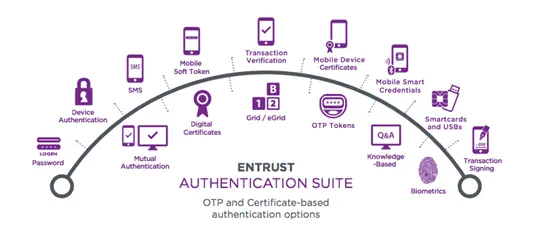
Entrust offers a one of the widest range suite of award-winning IAM solutions to provide user authentication, authorization, and access control to the right resources anytime, anywhere. Within a single, unified platform, organizations can leverage powerful MFA tools and authenticators, including biometric authentication to protect sensitive data while delivering a seamless and secure user experience.
Don't let outdated authentication methods leave your organization vulnerable. Learn more about how Entrust’s intelligent IAM platform can deliver enterprise-grade security without compromising convenience in our eBook, Securing Your Largest Attack Vendor: Identity.
FAQs
Why is multi factor authentication important?
MFA is essential because passwords alone cannot protect data and systems from threats in today’s digital environment. Most data breaches are due to compromised credentials, which may result from other breaches or from social engineering tactics. MFA adds an extra layer of security by requiring multiple verification factors—something you know (like a password), something you have (like a phone), and something you are (biometrics).
With MFA, even if attackers steal your password, they still can't access your accounts without additional authentication factors.
How do I enable multi factor authentication?
For businesses, MFA is often enabled through identity management systems, where administrators can enforce policies across all users. First, decide which systems, applications, and user accounts will require MFA based on security needs and compliance regulations. Then choose the authentication method you want to use, like SMS, OPT, soft tokens, hardware tokens, voice calls, or an authenticator app. Depending on your chosen solution, follow the guidelines to integrate it into existing systems, then test it to make sure it is working correctly.